- DATE:
- AUTHOR:
- Brian Park
Updates to IPR and spacing in the treatment plan viewer
Viewing IPR and Spacing
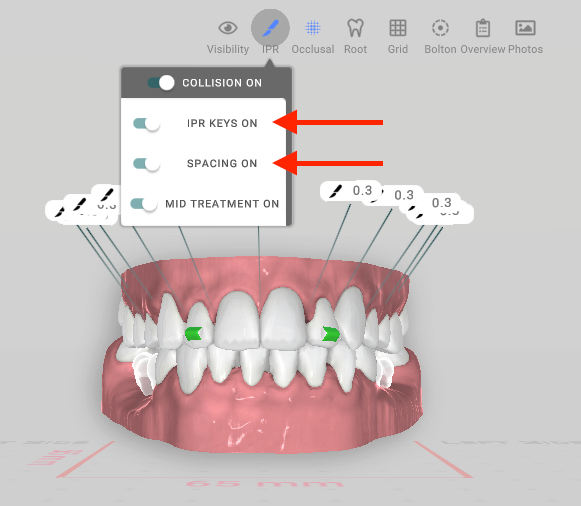
You can now show or hide IPR and spacing labels independently in the treatment plan viewer. Click the IPR tool at the top of the viewer to open the label menu, then toggle IPR labels and spacing labels on or off separately.
(Mid Treatment is in development and not yet active in this update.)
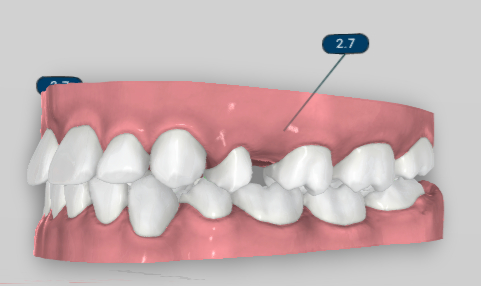
Spacing labels (such as the ones shown below in navy) are now hidden by default.
Changes to Overcorrection
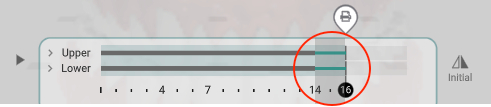
Overcorrection stages are now highlighted in green on the staging slider. They have also been removed from the Interproximal Reduction section of the Treatment Overview printout included in the aligner kit to avoid confusion between overcorrection and IPR.
Other Updates
Faster loading times
The treatment plan viewer now opens to a frontal/anterior view by default, instead of a slightly overhead angle
The IPR label icon has been updated to a knife icon on treatment plan viewer models